
What Is Base44? How the AI App Builder Works in 2026
A practical beginner's guide to AI-generated apps, databases, permissions, costs and deployment.
Updated
What’s changed (3)
- Simplified wording for easier reading.
- Expanded coverage and refreshed the guide.
- Expanded coverage and refreshed the guide.

Base44 is an advanced AI app builder that enables anyone to design, develop, and deploy full-stack web applications using natural language. It functions as an intelligent assistant that handles the complex backend and frontend architecture so you can focus entirely on your project requirements.
Base44 is an advanced AI platform that allows users to build web applications using plain language prompts rather than manual coding. While the name sounds similar to the technical term Base64, Base44 is an application development tool, not an encoding standard.
Base44 is an AI app builder. It turns plain-language instructions into working web apps. You do not need to set up a frontend, database, auth service or hosting separately. Instead, you describe the app you want. Then, you review the builder's work. You can refine it with more instructions or code edits. That is why people call Base44 a vibe coding platform.
There is a big difference between a working app and a finished product. A generated screen does not mean payments work. It does not mean users can only see their own records. It also does not mean the app is ready for customers. This guide explains what Base44 actually builds. We cover how the pieces fit together, where the limits are, and how to test your first build. For practical examples, see our Base44 apps guide.
Quick answer: Base44 builds web apps from simple prompts. It includes database records, sign-in, backend logic, integrations and hosting in one platform. You must still define your needs, check permissions, test workflows and decide if the result meets your standards.
What is Base44, exactly?
Base44 is both a prompt-driven application generator and a hosting platform. You can ask for a booking tool, CRM, private client portal, dashboard, learning app or public website. The builder creates the interface and the app structure. The platform provides data storage, user sign-in and deployment.
This makes it different from a standard page builder. A brochure website mostly just shows information. An application lets users do something. They sign in, create records, make requests, view private data or trigger actions. Base44 supports both types. However, a complex application needs more planning than a static website.
Base44's official product overview lists apps, websites, AI agents, backend tools and hosting. Its use-case catalog shows the types of workflows it handles. These product descriptions explain what it can do. They do not guarantee that every complex feature will work perfectly without testing.
How does Base44 work behind the scenes?
Think of a Base44 project as a series of connected layers, not just one AI image:
- Prompt and requirements. You define who uses the app and what they should do. You list what information it stores and how to measure success.
- Interface. The frontend shows forms, tables, menus, dashboards and other interactive screens.
- Data model. These entities define the records the app saves. Fields define the info inside each record.
- Identity and permissions. Sign-in verifies users. Access rules decide which data each user can read or change.
- Server logic and integrations. Backend functions handle tasks that should not happen in the browser.
- Hosting and iteration. The app runs in a hosted environment. You can watch how it behaves and make controlled improvements.
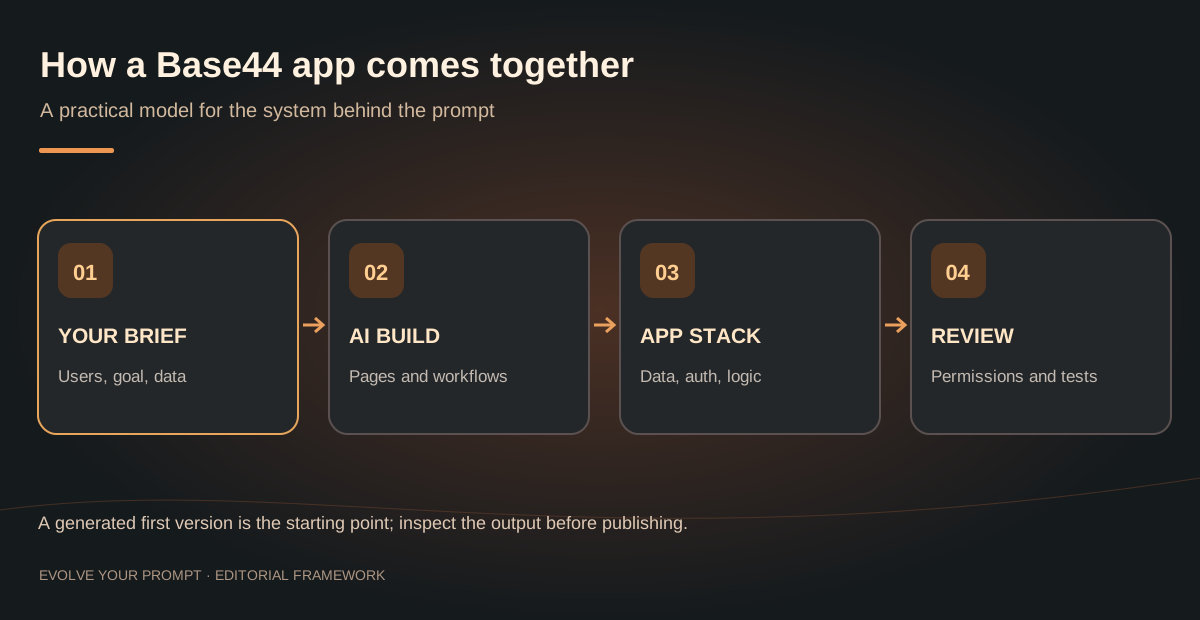
These layers can be generated together, but they do not become correct merely because they exist. A polished dashboard might still query the wrong entity. A client portal might show the right layout but expose another user's private files. Each layer needs its own acceptance test.
How to build your first Base44 app: a practical walkthrough
Start with a narrow, real task. A client request tracker is a good first project. It uses forms, users, data and basic permissions. You do not need large external integrations to build it.
Step 1: Write a short product brief
Specify a user, a job, a record and a success condition. For example: “A freelance designer needs a private place to track client requests. Each client can only see their own request status. The designer can update every request.” That is more helpful than saying “make a beautiful project management app.”
Step 2: Create one data entity
Define a Request record with title, description, client_id, status, created_at, and updated_at. Keep the first version small. If you add invoices, payment plans, file storage and analytics before the basic request flow works, you multiply the number of things that can go wrong.
Step 3: Give Base44 an acceptance-focused first prompt
Build a private client request tracker for a freelance designer.

Users: Owner and Client.
Entity: Request { title, description, client_id, status, created_at, updated_at }.
Workflow: A client signs in, submits a request, and sees only that client's requests. The owner can view and update all requests. Status options are New, In Progress and Completed.

Required screens: client request list, new request form, owner dashboard.
Security: enforce access restrictions on data operations, not just in the interface.
Design: readable, responsive, high contrast and accessible labels.
Acceptance tests: one client's data must not be visible to another client; status changes persist after reload; empty states and errors are helpful.

First build only this workflow. Summarize the entity, permissions and assumptions before adding optional features.
The prompt names roles and success criteria. It does not merely ask for a style. If the generated result lacks a required rule or screen, make that discrepancy the next small iteration.
Step 4: Test with two accounts
Create one owner account and two client accounts. Enter sample requests for both clients. Check that each client can only see their own records. Ensure the owner can manage the full list. Then try to break the rules. Ask if a client can change another client's record by modifying an ID. A hidden button is not a security boundary.
Step 5: Check responsiveness and empty states
Check your phone and desktop layouts. Look for long descriptions, missing files, empty lists, slow connections and error messages. A good empty-state message tells the user what to do next. A blank white box is not helpful.
Step 6: Publish only after a real walkthrough
Follow the full steps as a first-time visitor. Open the link, sign up, create an item, come back later and finish the task. Test any paid or integrated feature using the provider's test mode. Our step-by-step Base44 website tutorial covers details on publishing your site.
What can you build with Base44?
The best projects have a clear workflow and predictable data. These are suggested use cases. They are not claims that someone has independently built and verified these examples here:
- Customer relationship management: leads, contacts, tasks, pipeline stages and user visibility.
- Appointment booking: availability, reservations, cancellations and confirmations.
- Client portal: login, milestones, documents, requests and client access.
- Inventory dashboard: products, locations, stock movements and low-stock alerts.
- Member learning area: lessons, progress, enrollment and course materials.
- Internal operations app: checklists, approvals, assignments and audit trails.
For twelve ideas with prompts, ratings and data models, read Base44 apps: practical examples and build plans. To see screens, browse the app showcase.
How is Base44 different from other AI coding tools?
There are several different ways to use AI to make software. They should not be confused.
| Approach | What it prioritizes | Trade-off |
|---|---|---|
| Base44 | A fast, integrated route from brief to hosted application | Less reason to hand-configure infrastructure, but you must understand platform limits |
| Code-first AI assistant | Editing a codebase with more direct development control | You usually manage more architecture, testing and deployment decisions |
| Traditional no-code platform | Visual components, workflows and configured logic | Complex behavior may require learning the platform's own abstractions |
| Static website builder | Content pages and relatively simple interactions | Not automatically suited to private, multi-user workflows |
Your choice depends on your app requirements. Do not just look at a pretty demo. Compare Base44 vs Replit, Claude Code vs Base44, or our independent Base44 review.
Does Base44 require coding?
No for a basic first build; often useful for advanced work. Natural-language prompts can create a good starting point without code. However, coding knowledge helps with debugging, custom APIs, performance, accessibility, business rules or secure integrations.
Even non-developers should learn a few core concepts: entities store records, authentication identifies a person, authorization limits access, backend functions run server operations and APIs move information between services. Our Base44 and AI app development glossary explains these terms in plain English.
Is Base44 free, and what do credits mean?
Base44 has a free tier and paid plans. Check the official pricing page for the latest details. The free tier includes allowances for builder messages and integration activity. Paid plans offer different limits and features. Prices and allowances can change, so verify your plan before you start a project.
The main difference is the cost to build and revise an app versus the cost when a running app calls services. A dashboard that just reads records acts differently than an AI assistant that answers many questions. Read the Base44 pricing breakdown and integration credits guide instead of guessing based on screen counts.
What are Base44's limitations?
Base44 removes setup work, but you remain responsible for your product. Ask these questions before you depend on it for a workflow:
- Does every role have the correct data access? Check backend rules instead of just the UI.
- Can you track and fix mistakes? Keep backups and test data separate from production.
- Can integrations fail safely? Consider retries, limits and event handling.
- Can the interface handle high volume? Test long lists, concurrent users and mobile devices.
- Is the app portable? Review code export, APIs and vendor dependencies.
- What does usage cost? Budget for platform credits and third-party services.
For integrations, read our Base44 integrations implementation guide. For errors, visit the Base44 FAQ or stuck-on-thinking troubleshooting guide.
Is Base44 good for SEO-focused websites?
Base44 can publish public web pages. However, Google ranking depends on crawlability, content, metadata, links and user experience. For apps using lots of JavaScript, make sure Google can actually read the final page. Do not assume a preview means it is indexable. Use clear titles, a good heading structure, image text and a sitemap.
Inspect important pages in Search Console to validate them. Compare the raw HTML to the rendered page and test paths on mobile. Google explains these principles in its SEO Starter Guide.
How to decide whether Base44 is right for you
Score your proposed app using four questions: workflow complexity, sensitive data, external integrations, and operating scale. If your first version is a simple internal tool for a few users with a modest data model, Base44 is a platform worth evaluating. If you are building a regulated product, a multiplayer system or heavy software, test the hardest requirement first. Plan for specialist development where needed.
Do not spend a week on colors before you prove the application works. A functioning but unpolished workflow gives you evidence about the product. A polished mockup may not.
Continue learning about Base44
These guides answer the next questions that commonly come up with this topic.
- 12 Base44 app ideas with prompts and workflowsFind a practical project and define a useful minimum viable app.
- Step-by-step guide to building a Base44 websiteFollow a practical workflow from planning through publishing.
- Base44 pricing plans and credit costsCompare plans and understand the costs before building.
- Connecting Base44 to APIs, webhooks and outside toolsChoose the right connector or server-side integration architecture.
For current platform features and policies, check the official Base44 documentation.
Explore related topics: Base44 beginner questions · AI app development terminology · Base44 examples from real builders
Conclusion
Base44 is an AI-powered tool for building and hosting web apps. It turns a well-scoped brief into a working app faster than building every component from scratch. Its real value is in how it speeds up setup and iteration. Your role is still to define the problem, check the results, and protect your users. Start with one complete workflow. Test permissions, measure costs, and then expand.
Understanding What Is Base44 vs. Base64 Encoding
Many newcomers search for what is Base44 hoping to understand data formats, only to find an AI app builder. It is important to distinguish the two. Base64 is a binary-to-text encoding algorithm defined by RFC 4648. It takes binary data, such as images or raw bytes, and translates them into an ASCII string of 64 printable characters. This method uses a 6-bit index and padding to ensure data transfer integrity across systems that only support text, such as email protocols or HTTP headers. Because it uses 24-bit buffers, it is a standard tool for embedding data URLs into web pages or managing binary payloads.
In contrast, Base44 is a modern AI platform designed for software development. It does not perform encoding tasks. Instead, it functions as a no-code environment where your instructions become a functional React app with a database and user authentication. If you are looking to build a professional dashboard or a custom tool, Base44 examples will show you how to structure your prompts. While Base64 handles the mechanics of how computers represent bytes, Base44 handles the mechanics of how businesses represent logic. When working in Base44, you define your requirements in plain language, and the AI handles the complex stack that would traditionally require manual coding or deep backend knowledge. You can find more technical documentation on how to structure your projects at the official Base44 documentation.
Core Mechanics of the Base44 AI Platform
Base44 translates your intent into a structured JSON representation of an application. By leveraging AI to write the underlying logic, it bypasses the need for traditional manual setup. The platform automates the creation of the database schema, the frontend interface, and the API endpoints that connect them. This shift allows creators to move from a raw idea to a deployed product in hours rather than weeks. For those just starting, our Learning paths cover how to refine these prompts for better results.
How the Platform Handles Logic
When you provide a prompt, the system breaks your requirements down into:
- Data entities: Defining how records interact, similar to relational databases.
- Authentication flows: Setting up user identity and access control.
- Interface generation: Creating responsive screens that handle user inputs.
The system ensures that your app remains URL-safe and compatible with modern web standards, but it operates at the application layer rather than the protocol layer. Unlike manual coding, you do not need to manage individual bits or bytes to get a working product. If you are comparing this to other development methods, check our comparisons to see how this workflow stacks up against manual frameworks. By focusing on the user experience and business logic, Base44 allows you to iterate faster. Whether you are building an internal tool or a public-facing product, the process remains consistent: define the data, set the permissions, and let the AI build the implementation.
Understanding What Is Base44 and Its Core Capabilities
At its heart, Base44 transforms your intent into functional software through a unique builder chat interface. By describing your needs, you initiate the app creation process where the AI acts as your primary developer and strategic partner. Unlike traditional drag-and-drop tools, this platform uses a sophisticated visual editor that allows you to inspect and modify generated components in real time.
The Role of Your AI Collaborator
Think of the platform as an AI collaborator that understands your logic as well as your layout. You define the data entities and business rules, and the system generates the corresponding database schema, authentication logic, and responsive user interface. This tight feedback loop between your natural language prompts and the visual output is what sets the experience apart from manual coding. To get a better sense of what this process looks like in practice, explore our Base44 examples.
Key features that define the platform include:
- Natural Language Processing: Translation of complex business rules into executable code.
- Integrated Deployment: One-click publishing that handles hosting, domain mapping, and SSL automatically.
- Real-time Visualization: A live workspace where you can see changes instantly.
- Permission Management: Built-in tools for handling user roles and data access rights.
For those ready to dive deeper into the technical mechanics, the official documentation provides extensive detail on managing your project architecture.
Common Use Cases: Building Internal Tools, SaaS, and Prototypes
The flexibility of an AI-driven app builder like Base44 makes it ideal for a wide variety of development tasks. Whether you are validating a new idea or optimizing internal operations, the speed of development remains a distinct advantage. Many users begin by building internal tools to manage company data, such as inventory trackers, HR dashboards, or task management systems. Because the platform includes built-in database management, you can quickly move from an idea to a functional prototype that performs real-world actions.
Scaling from Prototype to SaaS
Beyond simple internal tools, Base44 is highly effective for building consumer-facing SaaS products. You can implement complex workflows, user authentication, and third-party API connections through the builder chat. If you need to connect your application to other services like email providers or payment gateways, review our guide on Base44 Integrations to understand how to maintain reliable connections.
This approach to app creation is particularly useful for:
- MVPs (Minimum Viable Products): Validate concepts with real data without writing a single line of traditional code.
- Custom SaaS Portals: Create secure client environments with per-user data isolation.
- Internal Workflows: Streamline manual processes with custom-built forms and automation logic.
- Data Aggregators: Design custom views that pull information from multiple sources into a single dashboard.
By focusing on your specific requirements rather than the syntax of a programming language, you gain the ability to iterate much faster. Once your application is stable and tested, check our resources on Base44 Pricing to understand the long-term scalability of your project. Whether you are working on a solo project or a collaborative startup, this platform provides the infrastructure necessary to turn concepts into reality.
Frequently asked questions about Base44
Is Base44 a website builder or an app builder?
Both. It can produce public websites as well as interactive web applications with authentication, stored data and workflows. The requirements differ: a private multi-user tool needs access controls and data modeling, while a public content site needs crawlability and SEO structure.
Can you build a Base44 app without coding?
Yes, you can start and iterate with natural-language instructions. Coding experience is helpful for complex debugging, integrations, security reviews and advanced customization.
Who owns Base44?
Wix acquired Base44 in 2025. Base44 continues to operate as an AI app development platform. See the company's official background for the current account.
Can Base44 create an iPhone or Android app?
Base44 is centered on building web applications. Mobile distribution and native packaging have separate requirements, store policies and platform-dependent support. Review our mobile publishing guide before promising a native store app.
What should I build first in Base44?
Choose one repeated workflow with a clear user and measurable outcome: a request tracker, booking queue or simple CRM. Make one complete workflow work end to end before expanding features.
Are Base44 apps secure by default?
The platform provides authentication and security tools, but your app's data model, permissions, provider secrets and business logic still require review. Test at least two accounts and verify access restrictions at the data layer.
What is the difference between Base64 and Base44?
Base64 is a technical encoding standard used to represent binary data as ASCII text. Base44 is an AI-powered platform used to build, host, and manage web applications.
Is Base44 owned by Wix?
No, Base44 is an independent platform built for AI-driven software development. It is not affiliated with Wix or other traditional website builders.
Is Base64 a form of encryption?
No, Base64 is merely an encoding scheme. It is designed for data transfer and is easily decoded by anyone, so it provides no security or confidentiality.
What is the purpose of padding in Base64?
Padding is used in Base64 encoding to ensure that the encoded data length is a multiple of four, maintaining consistency when processing binary-to-text data.


Niko Lee
Niko writes about the choices behind a working Base44 app, from clearer prompts to data and permissions. These guides are here to help you understand the next step, try it in your own project, and know what to check afterward.
About Evolve Your Prompt THE EVOLVE YOUR PROMPT DISPATCHLiked this guide?
Liked this guide?
Get the next one first.
A guide is most useful when it helps with something you are building. Subscribe for Base44 tutorials, prompts, and practical explanations you can return to when you need them. If they stop being useful, you can unsubscribe anytime.
↗ / KEEP THE MOMENTUM
Your next good read.

Base44 Apps: 12 Practical Ideas, Examples & Starter Prompts
Explore 12 practical Base44 apps you can plan and build, with starter prompts, essential data models, security considerations and an MVP checklist.

How to Build a Website Using Base44: A Complete Guide
Learn how to build a website using Base44: planning your pages, writing the first prompt, editing the design, adding a blog, connecting a domain and setting up SEO.

Base44 vs Replit: Which Is Better for Building Apps?
Base44 vs Replit compared: ease of use, how pricing and credits work, code control, hosting and which builders each tool suits best.