
Base44 Apps: 12 Practical Ideas, Examples & Starter Prompts
Choose a valuable workflow and build an app people can actually use.
Updated
What’s changed (1)
- Expanded coverage and refreshed the guide.

Base44 apps are interactive web applications created with the Base44 AI builder. They can be internal business tools, customer portals, trackers, marketplaces, learning platforms and many other products. The best first project is not necessarily the most impressive-looking idea. It is the one with a clear user, an obvious task and a workflow you can test from beginning to end.
This guide gives you 12 Base44 app ideas, the underlying data each needs, realistic scope considerations and starter prompts you can adapt. The examples are planning concepts—not screenshots or verified live customer projects. To understand the platform itself, start with what Base44 is and how it works.
A useful rule: Choose one person, one painful recurring task, and one outcome you can verify. Build that before adding advanced AI, payment systems or complex dashboards.
Which Base44 apps are worth building?
The strongest candidates solve a recurring problem and keep data structured. A lightweight app that replaces a confusing spreadsheet may deliver more value than a feature-rich prototype no one uses. Consider how often the task occurs, who owns its information and whether the person completing the task would return tomorrow.
The following twelve ideas are grouped by the type of job they solve. Each includes a suggested minimal feature set and one important constraint. Complexity ratings are editorial estimates, not measured build times.
| App idea | Minimum viable workflow | Complexity |
|---|---|---|
| Client request portal | Client submits request, owner updates status | Moderate |
| Simple sales CRM | Record lead, assign owner, schedule follow-up | Moderate |
| Appointment booking | Show slots, reserve, confirm | Moderate–high |
| Inventory tracker | Log stock movement and show balance | Moderate |
| Team project board | Create tasks, assign, move status | Moderate |
| Customer feedback board | Submit idea, vote, prioritize | Moderate |
| Learning progress app | Open lesson, complete, resume | Moderate |
| Event RSVP manager | Invite, RSVP, manage attendance | Low–moderate |
| Volunteer scheduler | Define shifts, claim, confirm | Moderate |
| Personal budget tracker | Categorize transaction, compare budget | Moderate |
| Support knowledge assistant | Retrieve answer, escalate uncertain case | High |
| Contractor job tracker | Create job, attach updates, close out | Moderate |


1. Client request portal
Who it serves: freelancers or agencies who need one place for customer requests and delivery status.
Minimum data: Clients, Requests, Updates and Attachments only if files are needed. Make each request belong to a client and assign an owner. Start with statuses such as New, In Progress, Waiting and Complete.
Starter prompt: “Build a client request portal with private logins. Clients can submit requests and view only their own status history; the owner can see all requests, update status and leave progress notes. Include an empty state and mobile layout.”
Risk to test: one client must never see another client's records, even when a record ID is changed manually. That is a backend authorization requirement, not a hidden-menu requirement.
2. Simple sales CRM
Who it serves: a small sales team tired of tracking leads in a shared spreadsheet.
Minimum data: Contacts, Companies, Opportunities and FollowUps. A useful first release shows the next action for every active lead, not a dozen vanity charts.
Starter prompt: “Create a lightweight CRM with lead owner, company, pipeline stage, expected value, due date and the next follow-up. Let team members filter their own opportunities and show overdue follow-ups first.”
Risk to test: duplicates and missing ownership. Add a clear rule for matching contacts and for reassignment when someone leaves a team.
3. Appointment booking app
Who it serves: salons, tutors, consultants or service businesses with repeat bookings.
Minimum data: Services, Staff, Availability, Bookings. Your first release must prevent two customers from claiming the same slot, including simultaneous requests.
Starter prompt: “Build an appointment booking web app with service duration, staff schedules, client details, confirmation and cancellation. Block double-booking at the data layer and show times in the customer's timezone.”
Risk to test: time zones, daylight-saving changes, cancellations, payment reversals and concurrent bookings. Calendar styling is the easy part.
4. Inventory management dashboard
Who it serves: a small retailer or warehouse operation with products in multiple locations.
Minimum data: Products, Locations, StockMovements and optional Suppliers. Record the reason and author for each adjustment rather than allowing unexplained overwrites.
Starter prompt: “Create an inventory tracker that records incoming and outgoing stock movements, shows a current balance by location, flags low stock and keeps an audit trail for adjustments.”
Risk to test: a stock balance should reconcile from movement records. Directly editing a displayed total can hide mistakes.
5. Team task and project board
Who it serves: a small team coordinating projects, deliverables and approvals.
Minimum data: Projects, Tasks, Members, Comments. Start with a list and board view, due dates, task ownership and an activity log.
Starter prompt: “Build a project tracker where members can create and assign tasks, move them between Backlog, Doing, Review and Done, and see their upcoming deadlines.”
Risk to test: task updates must persist after refresh; permissions should distinguish observers from editors.
6. Feedback and feature request board
Who it serves: software teams or online communities deciding which features to build next.
Minimum data: Ideas, Votes, Statuses and Comments. A good first release prevents duplicate votes and explains what each status means.
Starter prompt: “Build a public feedback portal where signed-in users submit ideas, vote once per idea and follow a roadmap with Planned, In Progress and Shipped labels.”
Risk to test: spam, fraudulent voting and accidental disclosure of private customer suggestions.
7. Learning progress tracker
Who it serves: tutors, independent educators and course creators.
Minimum data: Courses, Lessons, Enrollments, Progress. A simple free course needs a reliable resume point and clear lesson order before certificates or payments.
Starter prompt: “Create a learning area with courses, lesson order, a completion checkbox and a progress summary. Users should see their own progress after returning on another device.”
Risk to test: enrollments and paid lesson access must be checked server-side, not merely hidden behind a blurred UI.
8. Event RSVP manager
Who it serves: organizers of workshops, meetups, community activities and private events.
Minimum data: Events, Invitations, Guests, Responses. Include capacity, guests-per-invite and an attendee export.
Starter prompt: “Build an RSVP page for one event with a capacity limit, plus-one policy, attendee confirmation and a simple organizer dashboard.”
Risk to test: two people responding simultaneously should not exceed capacity; never expose private guest contact details publicly.
9. Volunteer scheduling app
Who it serves: nonprofits and community organizations assigning people to time slots.
Minimum data: Volunteers, Shifts, Assignments, Notifications. A first release should show open shifts and whether a claim succeeded.
Starter prompt: “Create a volunteer scheduling portal. Organizers publish shifts with capacity; volunteers sign up, view their upcoming shifts and cancel within policy limits.”
Risk to test: conflicting shifts, last-minute cancellations and notification delivery failures.
10. Personal budget tracker
Who it serves: someone who wants visibility into spending without complex accounting software.
Minimum data: Transactions, Categories, Budgets, Accounts. Importing data and reconciliation are separate features; begin with careful manual entry if necessary.
Starter prompt: “Build a private monthly budget tracker with income and expense categories, editable limits, recurring transactions and a month-by-month spending view.”
Risk to test: financial calculations must reconcile, private data must remain private, and the app should never imply it replaces professional financial advice.
11. Customer support knowledge assistant
Who it serves: a team repeatedly answering questions from its own help articles.
Minimum data: Articles, Conversations, Handoffs. The assistant should use approved sources, give an explicit fallback when uncertain and offer a human escalation path.
Starter prompt: “Create a help center with searchable articles and an AI assistant that answers only from the published help library, cites its source and routes unresolved questions to a human.”
Risk to test: inaccurate answers, prompt injection, sensitive data exposure and runaway AI usage. Read Base44 integrations before connecting outside systems.
12. Contractor job tracker
Who it serves: home service teams coordinating estimates, jobs, materials and completion updates.
Minimum data: Customers, Jobs, Visits, Materials and optional Photos. Start with scheduling, assigned technician and status.
Starter prompt: “Build a job tracker for a small service company. Each job has a customer, scheduled visit, assigned technician, notes, photos and Completed status; office staff can review all jobs.”
Risk to test: phone usability in poor connectivity and correct role permissions between technicians, office staff and customers.
How to choose the right Base44 app idea
Prioritize ideas that are frequent, narrow and testable. Use a score from 1 to 5 for each of these dimensions:
- Problem frequency: Is the task repeated daily or weekly?
- Clarity: Can you explain the main user outcome in one sentence?
- Data simplicity: Can the first release use fewer than five core record types?
- Integration dependency: Can the key workflow work without an external provider?
- Access risk: Can you test every role's permitted actions?
- Validation access: Do you have real users who can try the app this week?
An idea with a small audience and a measurable workflow can be a better first project than a grand social platform. High complexity is not a prohibition; it means you should break the project into milestones. Avoid presenting these editorial scores as empirical performance measurements.
The five-stage Base44 app-building framework
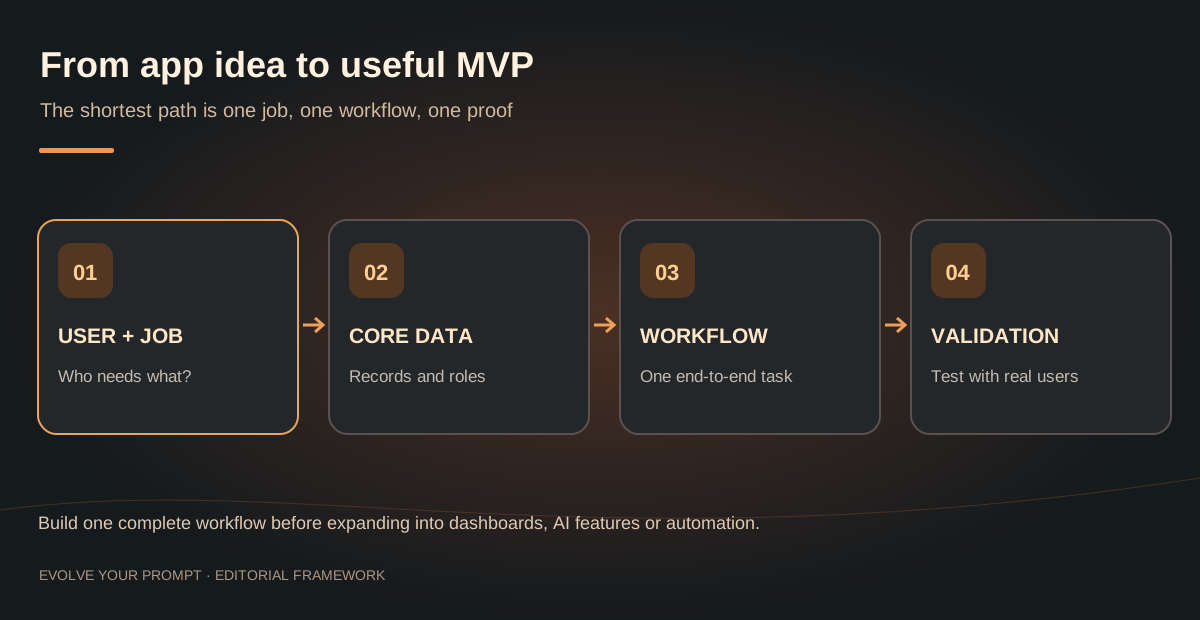
Stage 1: Define the result, not the interface
Write one sentence: “This app helps [user] complete [job] by [workflow].” Then record what counts as success. “Client submits a request and can later see its status” is testable; “modern intuitive dashboard” is not.
Stage 2: Model records and roles
List core entities, their fields and relationships. Define which role owns each record. Specify read, create, update and delete permissions before generating the UI. See the glossary definitions of entities and access roles.
Stage 3: Generate one complete vertical slice
A vertical slice is a single task running through UI, data, access rules and persistence. For a CRM, that means creating a lead, assigning it, updating its status and finding it again after a reload.
Stage 4: Test edge cases
Use different accounts, empty lists, duplicate submissions, slow network conditions, long inputs and mobile screens. Record each failure with a reproduction sequence. Fix the cause before adding another feature.
Stage 5: Publish, observe and refine
Launch to a small group who actually has the problem. Measure task completion, errors, time-to-value and repeat usage. Add features based on observed problems rather than guesses about what might look impressive.
How to write a better prompt for Base44 apps
A strong build prompt has a goal, user roles, entities, screens, permissions, acceptance tests and non-goals. These are the details most likely to prevent expensive back-and-forth.
Build a responsive [APP TYPE] for [PRIMARY USER].

The main job is: [ONE JOB TO COMPLETE].
Success means: [TESTABLE RESULT].

Roles: [ROLE A], [ROLE B].
Entities: [ENTITY 1 with key fields], [ENTITY 2 with key fields].
Pages: [ONLY THE REQUIRED PAGES].
Workflow: [START ACTION] -> [DATA SAVED] -> [RESULT SHOWN].
Permissions: each role may read, create, update and delete only its authorized records.

Requirements:
- Responsive on phone and desktop
- Clear empty, loading and error states
- Accessible labels and keyboard controls
- No third-party integration until the core workflow works
- Reproducible tests for access restrictions and saved data

Before adding extra features, summarize the resulting data model, permissions, and test plan.
Use that template for any idea above. For UI-focused work, describe content hierarchy, spacing, type scale, mobile navigation and accessibility. For sensitive workflows, request server-enforced authorization and explain exactly how it should be tested.
What should you avoid building first?
Some projects require more assurance than a prompt-generated demo: regulated patient records, payment custody, safety-critical calculations, large multi-tenant systems and high-frequency real-time games. That does not necessarily mean they are impossible. It means the first version must prove the highest-risk requirement through testing and specialist review.
Similarly, do not assume that an app is production-ready because the homepage loads. Validate duplicate transactions, authentication, backups, downtime behavior and recovery. For public pages, check metadata, crawlability and mobile performance before calling the site SEO-ready.
What do Base44 apps cost to run?
Costs depend on the plan, message usage, integrated services and third-party providers. A static informational app behaves very differently from a chatbot that calls an AI model for every visitor. Separate build credits from runtime integration usage, and calculate the cost of a representative action at your expected daily volume.
Consult the current official Base44 pricing page, our Base44 pricing explanation and the integration credit walkthrough. Avoid assuming that a subscription covers arbitrary charges from external services.
Can Base44 apps become real businesses?
They can support real workflows, but an app business needs more than generated screens. Clarify who pays, why they return, how support works, what happens when a vendor changes pricing, and how you manage privacy and uptime. A simple, reliable product for a niche audience may have a stronger business case than a broad clone of an established platform.
If you have no validated customers, use the first release to learn: interview a handful of likely users, observe them completing the core task and remove features that create friction. Base44's official use-case library provides broad inspiration; our showcase organizes illustrative project concepts.
Continue learning about Base44
These guides answer the next questions that commonly come up with this topic.
- What is Base44 and how does the AI app builder work?Learn the platform fundamentals and first-app testing steps.
- Step-by-step guide to building a Base44 websiteFollow a practical workflow from planning through publishing.
- Connecting Base44 to APIs, webhooks and outside toolsChoose the right connector or server-side integration architecture.
- Independent Base44 review and hands-on assessmentLearn where Base44 performs well and where its limitations matter.
For current platform features and policies, check the official Base44 documentation.
Explore related topics: Real Base44 examples · Tools and learning resources
Conclusion
The best Base44 apps are not necessarily the largest or the most visually spectacular. They solve a specific job, store the right information, respect permissions and let users complete a reliable workflow. Choose an idea with reachable users, build one vertical slice, test it honestly and expand only when people show you what they need. That is a stronger foundation than chasing app ideas purely because they are trending.
Core Features and Backend Infrastructure of Base44 Apps
Building robust Base44 apps requires more than just a great user interface. Our platform functions as a comprehensive no-code AI app builder that manages your entire stack. By utilizing ai-assisted generation through a conversational builder chat, you can define your data models and application logic without writing manual code.
Infrastructure and Database Management
Base44 handles all backend and database management automatically. You do not need to worry about server maintenance, as the platform ensures your production infrastructure is secure and scalable. Key technical advantages include:
- User Authentication: Secure, built-in identity management for your apps.
- API Endpoints: Connect your app to external services seamlessly via Base44 Integrations.
- Custom Domains: Bring your own brand to the web with easy custom domain setup.
- Responsive Design: Every app built is optimized for mobile and desktop screens by default.
Learn more about the technical specifications at the official documentation. Whether you are focusing on automated workflows or integrating complex payment processing, the platform provides the stability of a managed service while keeping the flexibility of modern software development. You can observe your app performance directly through built-in app analytics to refine your project over time.
Scalability and Strategy for Base44 Apps
Many users explore Base44 to create a saas prototype or to streamline their internal tools. The process of vibe coding with AI agents allows you to iterate faster than traditional development methods. If you are wondering about the longevity of your project, Base44 apps are designed to grow with your needs, from simple trackers to complex service portals.
Enterprise and Export Considerations
One common question is whether Base44 is suitable for enterprise-grade SaaS applications. The platform offers the necessary security and data integrity features to support professional business use cases. While you cannot export the raw underlying code to host it elsewhere, this allows Base44 to manage the heavy lifting of security, database updates, and compliance for you. This approach ensures your production environment remains stable as your user base expands.
Before you dive into a large project, explore our learning paths to understand how to structure your database effectively. By starting with a single, clear vertical slice of your app, you ensure that your final product remains performant and easy to maintain. We provide extensive Base44 examples to help you visualize how different data structures translate into functional, real-world tools that solve actual business problems.
Frequently asked questions about Base44 apps
What apps can be made with Base44?
Base44 is suited to many interactive web apps, including CRMs, client portals, booking tools, inventory trackers, dashboards, educational tools and workflow applications. The complexity and quality of each result depend on the requirements and subsequent testing.
Can I build a Base44 app for free?
Base44 has a free plan with limited message and integration credits. Check current plan details before choosing features or integrations.
Are these examples real apps built with Base44?
The twelve examples in this guide are editorial app concepts and starter prompts. They are not presented as independently verified customer deployments; see the official use-case gallery for Base44's published examples.
Can Base44 apps have user logins and private data?
Yes, Base44 offers authentication and data features, but builders must define and test authorization rules for each role and entity. Private data should be protected by server-side access rules, not only hidden UI.
Are Base44 apps mobile-friendly?
Base44 can create responsive web interfaces. Native app-store distribution is a separate workflow with store policies and additional requirements; see the mobile publishing guide.
Which Base44 app idea should a beginner choose?
Start with a small task tracker, appointment request system or simple client portal. Choose an idea with a clear user, few entities and a workflow you can test end to end.
Can I export my code from Base44 to host it elsewhere?
Base44 acts as a managed platform, meaning the code is optimized to run specifically within our secure, high-performance environment. You cannot export the raw code for external hosting, which allows the platform to automatically handle all security updates, database management, and infrastructure scaling for your application.
How does Base44 manage database and backend infrastructure?
Base44 manages your entire backend automatically. You define your data requirements through the AI builder, and the platform provisions, secures, and maintains the databases and server-side logic. This removes the need for manual server configuration, allowing you to focus entirely on building your application features.
Is Base44 suitable for building enterprise-grade SaaS applications?
Yes, Base44 is built to handle the complexities required for professional and enterprise applications. It includes robust user authentication, secure data storage, and the ability to connect with external APIs, making it a powerful choice for businesses that need to deploy functional, scalable tools quickly.
What apps can be made with Base44?
You can build a wide range of web applications, including internal company tools, client portals, inventory trackers, scheduling systems, and custom CRM solutions. The platform is designed for any workflow that requires structured data management and user interaction.


Niko Lee
Niko writes about the choices behind a working Base44 app, from clearer prompts to data and permissions. These guides are here to help you understand the next step, try it in your own project, and know what to check afterward.
About Evolve Your Prompt THE EVOLVE YOUR PROMPT DISPATCHLiked this guide?
Liked this guide?
Get the next one first.
A guide is most useful when it helps with something you are building. Subscribe for Base44 tutorials, prompts, and practical explanations you can return to when you need them. If they stop being useful, you can unsubscribe anytime.
↗ / KEEP THE MOMENTUM
Your next good read.

What Is Base44? How the AI App Builder Works in 2026
What is Base44? Learn how its AI app builder works, what it creates, what to build first, and how to test an app before launch.

How to Build a Website Using Base44: A Complete Guide
Learn how to build a website using Base44: planning your pages, writing the first prompt, editing the design, adding a blog, connecting a domain and setting up SEO.

How to Publish a Base44 App to the App Store and Google Play
A step-by-step guide to publishing a Base44 app to the App Store and Google Play: what you need, how to run the store check, build your files, and submit them.