
Base44 Integrations: Connectors, APIs, Webhooks & Setup Guide
Connect external tools securely without losing track of permissions, reliability or credits.
Updated
What’s changed (1)
- Expanded coverage and refreshed the guide.

Base44 integrations connect an app to services outside its own database: email, calendars, AI models, messaging, payments, files and business software. There is more than one way to connect them, and picking the wrong method can expose credentials, waste credits or make a simple workflow unnecessarily fragile.
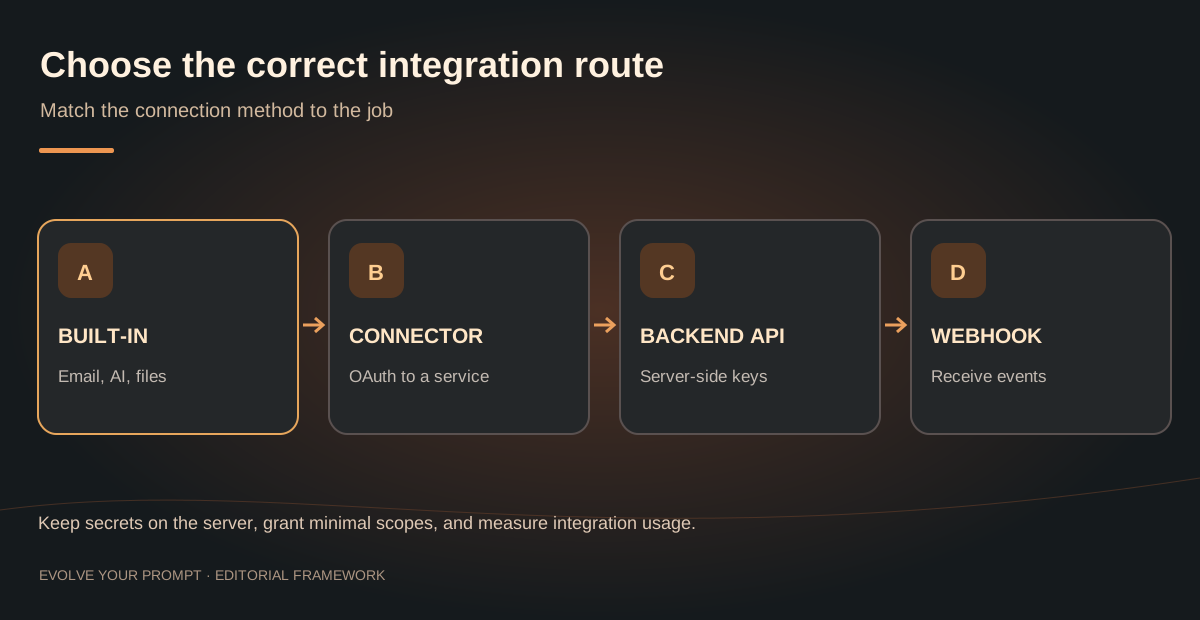
The practical choice is between built-in capabilities, authorized connectors, server-side external API calls, workspace-level integrations and event-driven webhooks. These are different architectures, not interchangeable buttons. This guide shows when to use each, how to prepare a connection, what to test and how to estimate operational risk. For the cost of actual integration usage, read our separate Base44 integration credits guide.
Quick answer: Start with a built-in feature if it meets the requirement. Choose an OAuth connector when the destination service is supported. Use a backend function with securely stored credentials for a custom API. Use a webhook to receive outside events. Validate scopes, errors, retries and actual account permissions before publishing.
What integrations does Base44 support?
According to Base44's official integrations directory, connectors include services such as Google Calendar, Slack, Notion, Salesforce and Google Drive. Base44 also supports built-in application services and integration approaches involving external APIs.
The available catalog and plan requirements evolve. Do not assume every integration is on every tier, or that a listed service supports every operation you want. A connection to Google Calendar, for example, is not automatically permission to edit every user's events or create bookings without clear consent.
Five integration patterns to understand
| Method | Best suited to | Main consideration |
|---|---|---|
| Built-in feature | Email, AI actions, supported file operations | Credit usage and provider limits |
| OAuth connector | Supported third-party tools such as calendar or messaging | Authorization scopes and token lifecycle |
| Backend function + secret | Custom APIs and proprietary services | Credential security, errors and rate limits |
| Workspace API integration | Shared API definition used by multiple apps | Governance and consistent configuration |
| Webhook endpoint | Receiving events from payment or automation services | Authenticity, retries and duplicate events |
Some connections combine methods: a connector may be invoked through server logic, and an external provider may call your webhook in return. Base44 documents product capabilities on its integrations overview; exact eligibility should be verified in your app workspace rather than inferred from a generic tutorial.
1. Built-in Base44 integrations
Built-in services are often the simplest choice when you need a supported action such as sending a message, running AI text generation, uploading content or extracting data from a file.
Example: An appointment request creates a database record and then sends a confirmation email. The record creation should remain the authoritative source of truth. Sending the email is an additional action whose failure should be visible and recoverable.
Before adding an integration, ask whether you truly need it. A task board with ten users may need no external services at all; a public AI assistant may call a model on almost every visit. Those apps have different operating costs even if their UI is similar.
Read Base44 pricing and how integration credits work to model expected usage. Avoid making fixed claims about credits per operation unless the current official documentation specifies them.
2. OAuth connectors to third-party tools
A connector establishes an authorized relationship between your Base44 app and another service. OAuth generally means the account holder signs in with the provider and approves requested permissions. That is preferable to collecting a person's password inside your app.
For a calendar workflow, define what you need before connecting:
- Read the user's availability, or create events, or both?
- Should one organization account connect, or must each user authorize their own account?
- What happens when someone revokes permission?
- Will the app show private attendee details to other users?
- How will you handle duplicate bookings and timezone changes?
Least privilege matters. Request only the access necessary for the user-facing task. Record which account owns the connection and test what happens if the user disconnects it.
The official Base44 connector listing is a better source for currently supported providers than a static list copied into a blog post.
3. Backend functions and custom APIs
Sometimes a third-party service is not available as a one-click connector or you need an operation outside a connector's features. A backend function is the appropriate boundary for using a secret API key, validating a request, transforming data or enforcing app-specific business logic.
Never place an API token in frontend JavaScript, query parameters, a public image URL or a prompt shown to users. Keep credentials in the platform's server-side secret mechanism. Give the backend function only the data it needs, and validate user authorization before calling an outside API.
Add a secure integration to [SERVICE] for this exact action:
When [AUTHORIZED ROLE] completes [TRIGGER], send [SPECIFIC FIELDS] to [ENDPOINT OR CONNECTOR ACTION].

Before coding:
1. Identify whether a supported built-in feature, OAuth connector or server-side API function fits best.
2. State required permissions and confirm which user/account grants authorization.
3. Keep third-party credentials in server-side secrets; never expose them in frontend code.
4. Validate the initiating user's access to the record.
5. Handle provider errors, expired tokens, rate limits, retries and timeouts.
6. Make repeated requests idempotent using a stable event/request ID where applicable.
7. Record success and sanitized error details for administrators.
8. Create a test checklist for both a successful action and a revoked or failing connection.

Implement the smallest complete integration first. Do not invent credentials or enable extra provider permissions.
This is a specification prompt, not a tested implementation. It gives the builder a reviewable plan. Adjust provider names, API authentication and field mapping to the actual service documentation.
A simple example: send a CRM update to an outside service
- A signed-in user updates an opportunity in your Base44 CRM.
- The app checks that the user is authorized to edit that opportunity.
- A backend action prepares an external request with only the required fields.
- The server uses its stored credential to call the provider over HTTPS.
- The function logs success or a non-sensitive error record.
- The UI shows an honest delivery state and offers a safe retry if appropriate.
Do not silently display “Synced” if the third-party request failed. Keep a provider request ID or idempotency key so repeated attempts do not create duplicates.
4. Webhooks: when outside services call your app
An API call typically starts inside your app and goes out. A webhook works in the opposite direction: an external provider sends an event to an endpoint your backend controls.
A payment provider may notify your app that a charge succeeded. A scheduling tool may announce that an event changed. Your app must verify the webhook's signature or documented authentication method before changing protected records.
Good webhook handlers also:
- Accept duplicate deliveries without applying the same business action twice.
- Respond predictably to retries and out-of-order events.
- Keep a durable receipt or event ID when the consequence matters.
- Avoid exposing personal data or credentials in error logs.
- Separate an external “payment confirmed” event from the browser's success screen.
Never grant paid access solely because the user returned to a success URL. Confirm the event through a trusted server-to-server channel and verify the relevant order.
5. Workspace integrations for repeat use
When multiple apps in one organization call the same external API, central configuration can reduce duplicated setup. Define the API's operations, approved credentials and expected responses once, then document which applications may use the integration.
This is primarily a governance choice: centralization helps with consistency, but it also increases the potential impact of a compromised integration. Keep credentials scoped to the smallest practical set of operations and review ownership when staff roles change.
If your project only has one lightweight connection, a dedicated backend function may be simpler. Prefer the architecture you can maintain and audit, not the one with the most technical moving parts.
How to connect Base44 to Google Calendar, Slack or another tool
The exact controls vary with plan, workspace and provider. The reliable sequence is:
Step 1: Define a single action
Write “When the owner approves a reservation, create a calendar event for that owner” instead of “integrate Google Calendar throughout my app.” A narrow scope is easier to authorize and test.
Step 2: Confirm the connector supports that action
Find the service in the Base44 integrations catalog. Check whether it reads or writes the type of data you need, which account authorizes it, and any plan limitations.
Step 3: Authorize with the minimum permissions
Review the consent screen carefully. Test with a dedicated account where possible. Never copy connection tokens into frontend code or share them in screenshots.
Step 4: Create a reliable application event
Tie the outside call to a validated action in your own app, such as approval of a booking. Define whether a repeat click should create a duplicate event or safely do nothing.
Step 5: Handle failure and reconnection
Test expired authorization, provider downtime, rate limits and accidental double-submission. A connection that works only once during a demo is not ready for users.
Step 6: Observe usage and costs
Record the number of external actions and their success/failure rates. Estimate monthly use from a realistic daily count, not only from the number of registered users.
Security checklist for Base44 integrations
Before enabling any connection for real users, confirm all of the following:
- Authentication: who is allowed to initiate the integration?
- Authorization: does a role have permission to read or send this specific record?
- Secrets: are all service credentials held on the server?
- Scopes: has the connector requested only the access it needs?
- Input validation: are IDs, dates, amounts and payload sizes checked?
- Output handling: could a provider response contain untrusted text or markup?
- Idempotency: can an action safely run twice?
- Rate limits: what happens when the provider returns a limit response?
- Retry policy: are transient failures retried without duplicating effects?
- Audit trail: can an administrator investigate a failed action without seeing secrets?
- Revocation: can the account owner disconnect access?
- Deletion: how do you handle data removal or retention requirements?
This is an operational review checklist, not a security certification. Sensitive data and regulated workflows can require expert review beyond these basics.
Why Base44 integrations sometimes fail
Use symptoms to identify the failing layer instead of immediately asking the AI to rebuild the whole integration.
| Symptom | Likely area to investigate | First test |
|---|---|---|
| Consent succeeds but action fails | Missing scope or wrong connected account | Check the authorized account and operation |
| Works for admin, fails for member | Role or record access rule | Reproduce using a real member account |
| Duplicate events or charges | Missing idempotency protection | Replay a provider event safely |
| Request times out | Slow provider, function limit or network issue | Examine server logs and timeout handling |
| Secret works locally but not in production | Environment configuration | Verify production secret availability |
| Usage unexpectedly rises | Repeated triggers or retries | Inspect per-action event counts |
If the failure is in the Base44 builder chat rather than a live connector, use our stuck-on-thinking troubleshooting guide. For broader definitions, visit the API, webhook and backend function glossary.
How much do Base44 integrations cost?
There are potentially three cost layers: the Base44 subscription, Base44 integration-related usage, and any separate charge from the service you connect. Not every connection incurs every type of fee, and both included usage and third-party terms can change.
For an estimate, define a unit operation: for example one approved booking may create one calendar event, send one email and optionally invoke an AI model. Multiply the expected number of such operations by the current documented usage for each action, then add provider charges and a safety margin for retries. Do not confuse a successful integration setup with unlimited free runtime usage.
For detailed credit budgeting, see Base44 integration credits explained; for plans, use the official Base44 pricing page.
When not to add an integration
An integration adds a dependency and a new possible failure point. If data lives comfortably in one entity and you only need a simple dashboard, keep it internal. If a service is mission critical, design a clear degraded mode before connecting it. If the workflow involves money or sensitive personal information, test with a sandbox and consider an experienced developer or security reviewer.
A dependable product does not need the greatest number of connections. It needs the smallest number that reliably completes the user's job.
Continue learning about Base44
These guides answer the next questions that commonly come up with this topic.
- How Base44 integration credits workUnderstand usage-based credits for live app features.
- 12 Base44 app ideas with prompts and workflowsFind a practical project and define a useful minimum viable app.
- Base44 pricing plans and credit costsCompare plans and understand the costs before building.
- What is Base44 and how does the AI app builder work?Learn the platform fundamentals and first-app testing steps.
For current platform features and policies, check the official Base44 documentation.
Explore related topics: Definitions of OAuth, webhooks and APIs · Developer resources
Conclusion
Base44 integrations can extend a useful app into messaging, scheduling, AI, payments and business workflows. The right architecture depends on who owns the connection, whether the operation is built-in, where credentials belong, and how the app recovers when something fails. Start with one clearly defined action, secure it, test the unhappy path and monitor usage before expanding to a larger automation system.
Essential Patterns for Base44 Integrations
Building robust workflow automation requires choosing the right connection type for your data. Base44 supports two primary categories: one-click connectors and manual API integrations. One-click, oauth-enabled connectors are best for popular services, offering seamless authentication and predefined trigger actions. For specialized needs, you must use manual api integrations, which allow you to define custom backend functions to interact with any service that provides an interface.
Handling Custom Logic
When you move beyond pre-built options, you enter the realm of secure connections. Always store your api keys and sensitive credentials in the platform's native secret management system. Never hardcode these into your app logic. Using backend functions provides an isolated environment to process data, perform transformations, or trigger transactional emails and complex data extraction tasks. By keeping this logic at the app level, you ensure your integration management remains centralized and auditable. You can explore more architectural patterns in our Learning paths section or check specific configurations in the official documentation.
If you find your application requirements are growing, consider how these connections impact your platform resource usage. Proper planning prevents overages and ensures that your data sync processes remain performant. For a deeper dive into cost-effective design, see our guide on Base44 integration credits.
Advanced Connectivity with OpenAPI Specs and MCP
Modern application development often requires standardizing how your app talks to the outside world. Base44 supports openapi specs, allowing you to import structured definitions to generate API endpoints automatically. This approach simplifies the connection process, ensuring your app adheres to the provider's schema for reliable data exchange.
Integrating Modern Tools
Beyond standard APIs, Base44 supports MCP connections, enabling a more direct, intent-based flow for interacting with sophisticated AI models and external data stores. These advanced methods are perfect for complex tasks such as:
- Syncing real-time state between different software silos.
- Automating multi-step user authentication flows.
- Executing proprietary backend functions based on specific user events.
Using these high-level abstractions, you can build smarter, more responsive applications that feel native to your users. Whether you are connecting to a local database or a global SaaS provider, the key is to prioritize security and reliability. If you need inspiration for your next project, look at our Base44 examples to see how these integrations work in practice. By utilizing OpenAPI and MCP, you reduce the boilerplate code required to maintain your connections and focus on building unique features. Always validate your endpoint responses to handle potential failures gracefully, and consult the Base44 glossary if you encounter unfamiliar terms regarding your app's communication layer.
Frequently asked questions about Base44 integrations
What integrations does Base44 have?
Base44 provides built-in capabilities and connections to third-party services. The current official integration directory lists available connectors, while custom APIs can be approached through server-side logic.
Can Base44 connect to Google Sheets or Slack?
Supported connectors and custom integration methods can connect Base44 to external productivity tools. Check the current directory, provider permissions and plan requirements for the exact action you need.
Can I call my own API from Base44?
For a custom service, the common approach is server-side backend logic using a securely stored API credential. Confirm the current app's capabilities and never put secret keys into public frontend code.
What is a webhook in Base44?
A webhook is an event delivered from another service to an endpoint your app controls. A secure handler verifies the sender, handles duplicate deliveries and updates records only after authorization checks.
Do Base44 integrations use credits?
Integration-related usage may consume platform integration credits, and third-party services may charge independently. Consult Base44 integration credits and official pricing for current terms.
What if an integration disconnects or fails?
Check which account authorized it, confirm permissions and plan support, inspect sanitized logs and test reconnection. Design recoverable failures and idempotent retries rather than repeatedly running actions without checking the previous result.
What is the difference between Base44 Connectors and manual API integrations?
Base44 Connectors are pre-built, oauth-enabled modules that handle authentication and standard operations for you. Manual API integrations involve using backend functions to send requests to an API endpoint, giving you full control over the data payload and logic when a specific connector is not available.
Can I use custom OpenAPI specs in Base44?
Yes, you can import custom OpenAPI specs into Base44 to automatically generate API endpoints. This allows you to quickly establish secure connections to external services that follow standard documentation formats without writing extensive boilerplate code.
What is an MCP connection and why should I use it?
An MCP connection allows your Base44 app to interface with external resources or agents using a standardized model context. You should use it to enable more sophisticated communication between your application's logic and complex AI-driven services or external data sources.
How can I secure my API keys in Base44?
You must store all sensitive credentials, such as api keys and secret tokens, within the platform's built-in secure backend functions. Never expose these keys in the frontend or within your application's public prompts to ensure your integrations remain protected from unauthorized access.


Niko Lee
Niko writes about the choices behind a working Base44 app, from clearer prompts to data and permissions. These guides are here to help you understand the next step, try it in your own project, and know what to check afterward.
About Evolve Your Prompt THE EVOLVE YOUR PROMPT DISPATCHLiked this guide?
Liked this guide?
Get the next one first.
A guide is most useful when it helps with something you are building. Subscribe for Base44 tutorials, prompts, and practical explanations you can return to when you need them. If they stop being useful, you can unsubscribe anytime.
↗ / KEEP THE MOMENTUM
