
The gradient everyone recognizes
Purple glow, rounded cards, a centered hero. Visitors spot AI slop in two seconds and leave.
The structured prompts I use to give Base44 a clearer brief, so you spend less time guessing what to ask and more time improving your app.
One payment. Lifetime access. New prompts every month.
Not ready yet? Get 10 prompts free.
 Design overhauls Locked down security Game systems
Purple glow, rounded cards, a centered hero. Visitors spot AI slop in two seconds and leave.
Default fonts, default spacing, default layouts. Your app looks like ten thousand others.
Open data, loose permissions, exposed keys. One bad review and the trust is gone.
You burn hours and credits rephrasing the same request, and it still never lands.
No real loop, no progression, no juice. Players try it once and never come back.
Clients, investors, and users judge quality instantly. Basic looks cheap.
The problem is not you. It is the prompt. AI builders give you exactly what you ask for, and most people do not know what to ask.
Drag the slider. On the left, what most builders ship. On the right, what the Vault helps you ship.
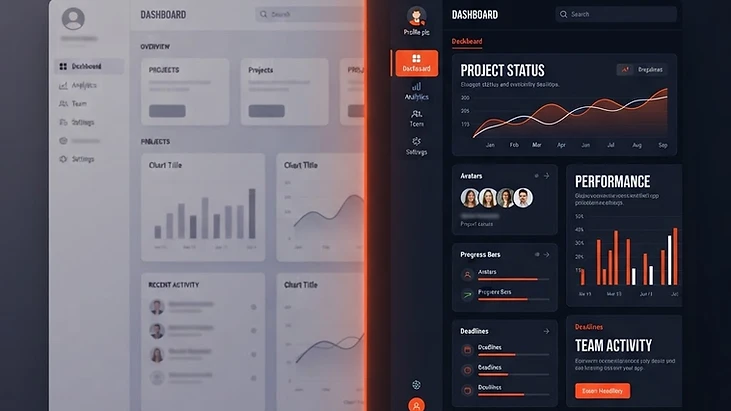
Other packs sell thousands of one-line prompts. The Vault gives you professional prompt systems. Here is the difference, free to steal.
Make my app look more professional and modern.
Vague. The AI guesses, you fix it, you reprompt, you repeat.
ROLE
You are a senior product designer with 15 years of experience shipping polished SaaS interfaces.

GOAL
Redesign the visual layer of this app so it looks like a premium, professionally designed product. Do not change any functionality, data, or page structure.

DESIGN SYSTEM
1. Typography: one clean sans serif family. Clear hierarchy with large confident headings, comfortable 16px body text, and line height around 1.6.
2. Color: a neutral base (near white background, near black text) with ONE accent color used only for primary actions and key highlights.
3. Spacing: an 8px spacing scale applied consistently. Give every section generous breathing room.
4. Components: consistent corner radius, subtle borders instead of heavy shadows, and clear hover and focus states on everything clickable.

QUALITY STANDARDS
• Every text and background pairing must pass WCAG AA contrast.
• Fully responsive. Check mobile first, then tablet and desktop.
• Remove gradients, emojis, and decoration that does not serve the user.

CONSTRAINTS
• Do not rename, remove, or move any features, buttons, or fields.
• Do not touch backend logic or data.

BEFORE YOU FINISH
Review every page against the standards above, fix anything that fails, then summarize what you changed in plain language.
Choose an area to see the kind of work each prompt supports. The previews give you a feel for the approach, so you can decide whether it fits the problem you are trying to solve.
Describe the goal, the people using the app, and the parts that should stay unchanged. A specific brief gives you something concrete to judge the result against.
A layout problem, a data problem, and a broken workflow need different questions. Choose the prompt that fits your task rather than asking for a complete overhaul every time.
A polished screen is not the same as a tested app. Check your important workflows and who can access the data before sharing a new version.

Install it once and every app you build starts from a designer's mindset. It teaches the AI your standards so you stop correcting the same mistakes over and over.

I have been designing websites and helping businesses grow online since 2014, with a special focus on SEO. These days I spend most of my time inside Base44, helping builders turn rough ideas into apps they are proud to launch.
I want to help you learn how Base44 works well enough to make your own decisions. That means explaining the thinking behind a prompt, what to check afterward, and when a quick fix needs a closer look. The guides here grow out of real projects and the questions builders bring to the community.
Get every prompt in the Vault, each new monthly prompt, and the Premium Design Skill bonus, all saved to your account.
Digital product with instant access. All sales are final.
To create a high-quality prototype, you need a repeatable process. The 5-Move Framework ensures your natural language instructions provide the context needed for a clean build. First, define the app purpose and describe your target audience clearly. Second, outline the core user flows and essential data fields. Third, specify your visual style and desired design preferences to avoid generic aesthetics. Fourth, detail the technical requirements and expected app logic. Finally, use an instructional prompt to review the initial output. This systematic approach allows you to shift from a broad concept to a functional reality. By mastering these moves, you move beyond basic zero-shot prompts and begin utilizing role-based prompts that tell the AI exactly who it is acting as. You can find more foundational concepts in our Base44 glossary. Referencing the official documentation alongside these prompts helps you align your expectations with the capabilities of this powerful app builder. Whether you are drafting a landing page or a complex dashboard, structure is your most valuable asset.
Building your entire application in one giant instruction often leads to diluted results. Instead, focus on iteration by building from the core outward to specific features. Start by generating the basic database structure, then move to individual components. If the AI misses a detail, use few-shot prompts to provide examples of exactly how you want the layout to function. This technique provides the AI with clear patterns to follow, drastically increasing the accuracy of your build. Once the initial build is complete, use the integrated chat modes for refining your work. Do not ask for a "fix" to a perceived flaw; instead, explain the desired outcome or the specific logic gap you have identified. This keeps the AI focused on construction rather than troubleshooting errors. Explore our collection of free starter prompts to see these frameworks in action across different project types. For deeper dives into architectural decisions, check out our mastering Base44 course. Remember that every interaction in your prompt library should serve a specific purpose, helping you refine your workflow and build faster.
Break complex features into smaller, atomic tasks using a logical sequence. Start by defining the data structure, follow with the user interface layout, and conclude with the specific app logic required. This prevents the AI from becoming overwhelmed by too many instructions at once.
Yes, you can provide the AI with specific examples or patterns in your prompt. By showing the AI screenshots or descriptive code snippets of preferred styles, you help it understand the visual aesthetic, padding, and layout constraints you require for your application.
Use the chat interface to provide specific, incremental feedback rather than asking for broad changes. Focus on the desired behavior or result you want, rather than pointing out flaws. This allows the model to adjust existing components without breaking the rest of your app.
The five moves involve defining your purpose and audience, mapping user flows and data fields, specifying visual style, detailing technical logic, and utilizing instructional review. This framework turns vague requests into precise instructions that result in highly functional and custom-built applications.
It is much more effective to build piece by piece. Start with your core architecture and database structure, then iteratively add features, navigation, and stylistic elements. Building in smaller chunks allows you to maintain better control over the code quality and overall design.
Describe the persona of your end-user in the first move of your prompt. Include details about their technical skill level, the primary goals they have within the app, and any specific accessibility needs. This helps the AI tailor the interface and language to your specific audience.


